 LiveTVIP
Your public IP address, in big type on your TV.
An Apple TV is often already plugged in and connected to your network. LiveTVIP uses it as a public-IP reporter. See the address the internet sees, when it was retrieved, and get notified when a later report comes back different.
Available on the App Store for Apple TV, iPhone, and iPad.
- 5 days of Pro, no payment method
- No sign-up form
- 30-day change history
- Alerts on TV, iPhone, ntfy, or webhook
How it works
Three steps to see your reported public IP.
No dynamic DNS account, no port forwarding, no shell script, no spare computer humming in a closet.
Install it on your Apple TV
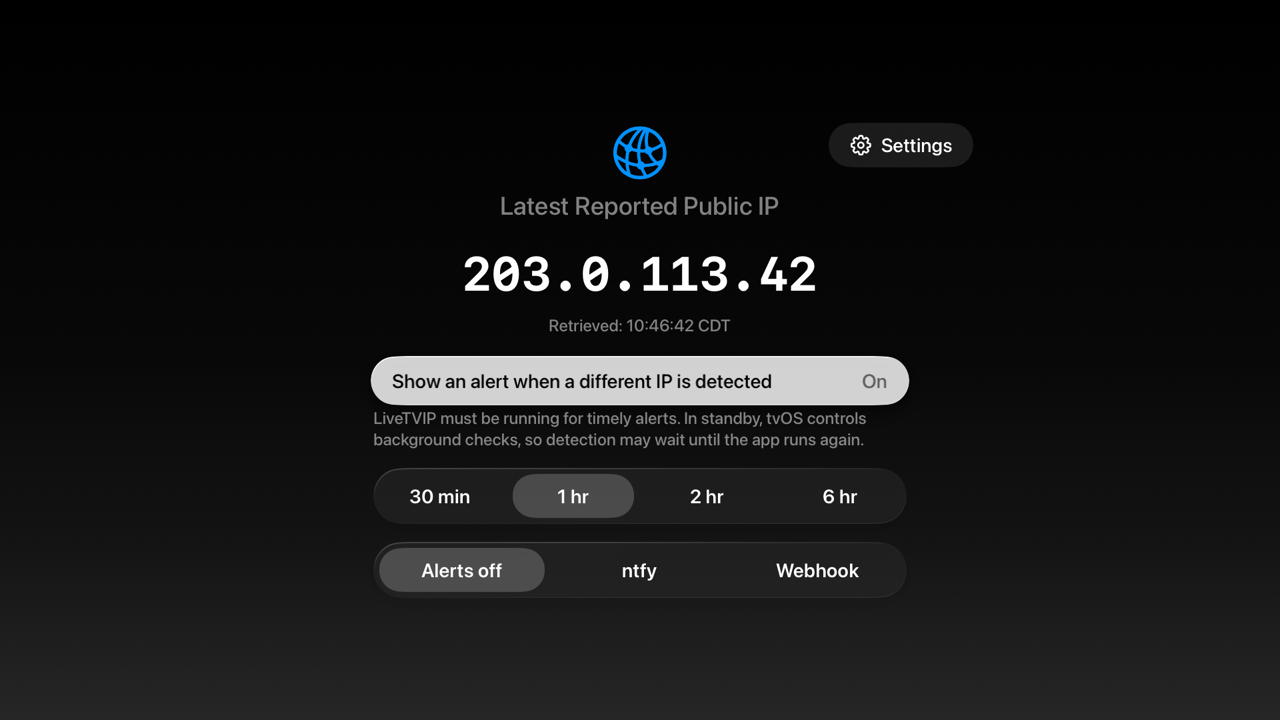
Open LiveTVIP and it retrieves the public IP address of the network your Apple TV is on, then puts it on screen in 72-point monospaced type with the retrieval time in your Apple TV's own time zone.
Add your iPhone or iPad
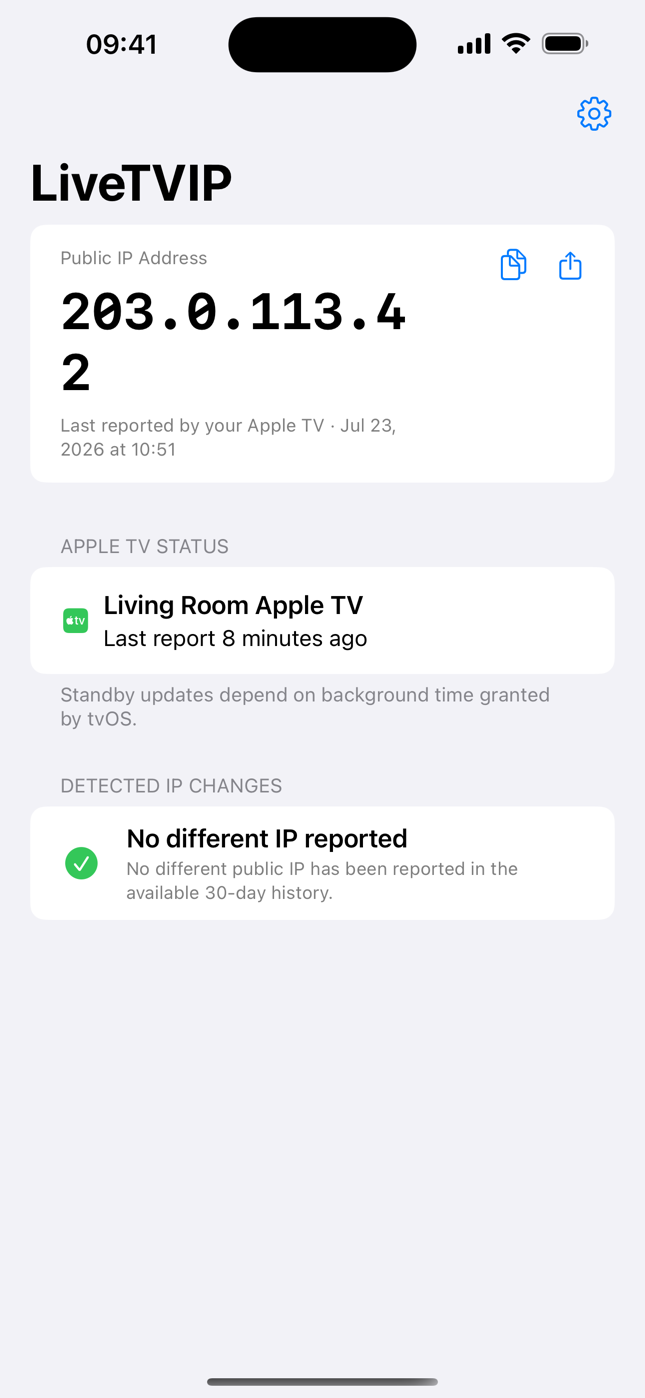
One universal purchase covers both. Use the same Apple Account and the companion links itself, then shows the latest address your Apple TV reported, how recently it reported, and 30 days of detected changes.
Pick how you want to hear about it
An on-screen banner on the TV, a push notification on your iPhone, an ntfy topic, a JSON webhook into your own automation, or several at once. Send a test alert first so you know the channel works.
Why it matters
A home connection's public address can change.
Residential ISPs may assign a different address after a modem reboot, a line fault, or a maintenance window. Services or access rules tied to the old address may then need to be updated.
Reach your own network from anywhere
Cameras, a NAS, a home VPN, a game server, SSH, or remote desktop may depend on the current address. LiveTVIP shows the latest reported address on the TV and on your phone, ready to copy or share.
Keep allowlists from breaking silently
Work VPN allowlists, firewall rules, database access lists, and API restrictions may be tied to an address that changes. LiveTVIP can notify you when it detects a different address.
Check a VPN or router change
The address on the screen is what the outside world observes coming from your network. Switch a VPN on, change a router setting, swap an ISP, then look at the TV and see what really happened.
Spot ISP re-addressing after the fact
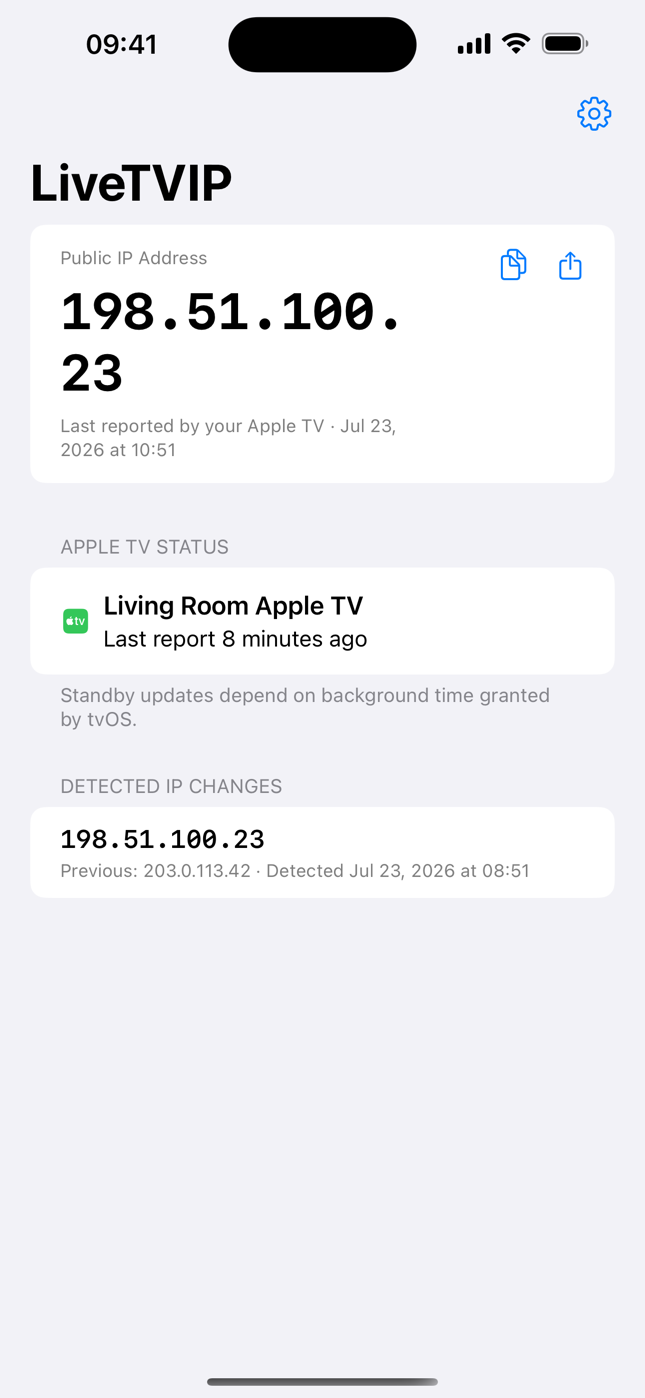
Detected changes are recorded with the previous address, the new address, and the detection time with its time zone. The iPhone app displays the previous 30 days of that history.
Watch a second home, a rental, or an office
Multi-Apple-TV plans cover up to five or up to 100 screens. Each one appears by name on the dashboard with its own report recency.
Feed your own automation
Point the webhook at your own endpoint to receive detected changes as JSON with the event, message, timestamp, old address, and new address. Use that data with whatever automation you already run.
Handy for households on dynamic IP addresses, remote workers, self-hosters, home-lab tinkerers, IT staff with sites to watch, and anyone tired of typing "what is my IP" into a browser on a machine that is not even at home.
On the television
Readable from the couch. Loud when it matters.
- The address, huge. Monospaced, high contrast, no squinting, no menus to dig through.
- The retrieval time, with the time zone. The timestamp shows when the displayed number was reported.
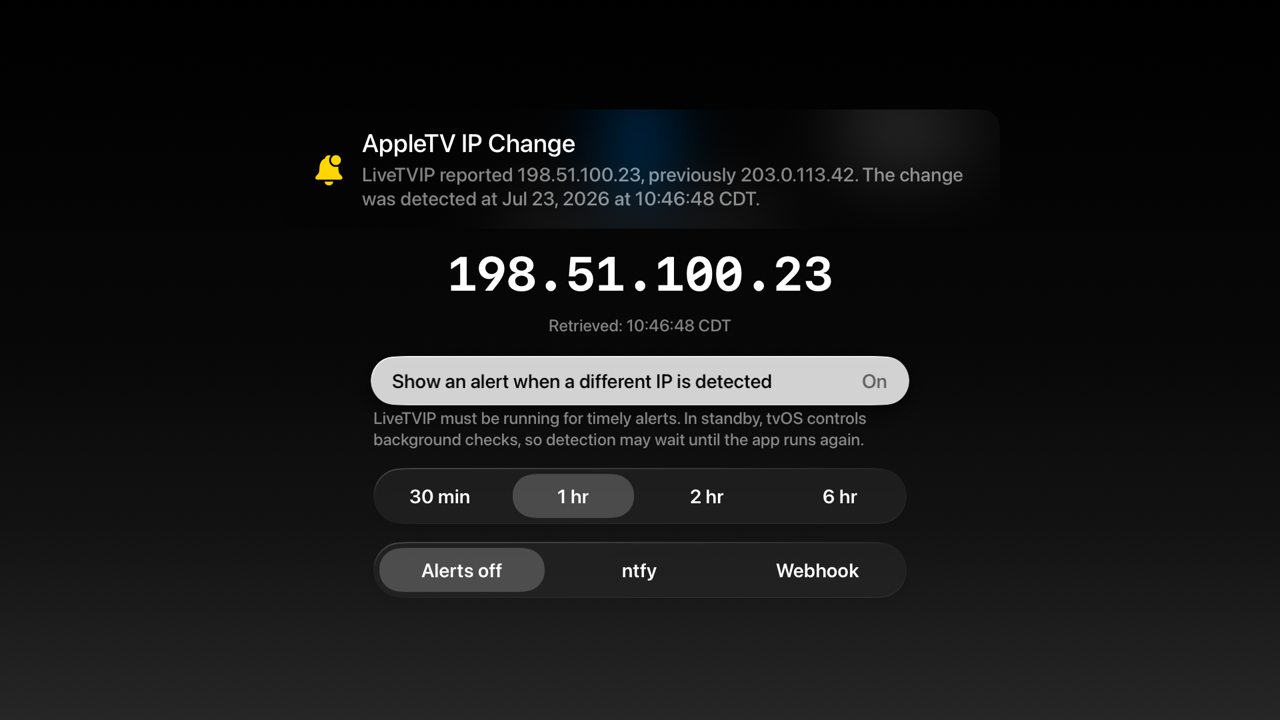
- An on-screen banner on a detected change naming the new address, the previous address, and when the difference was detected.
- Your preferred interval right there as 30 minutes, 1 hour, 2 hours, or 6 hours, with the alert channel beside it.
- Check IP Now on demand from Settings, with a daily allowance and a short cooldown so the service stays quick.
In your pocket
The number you need, when you are nowhere near the TV.
- The latest address your Apple TV reported, with the exact time of that report.
- Copy and share buttons on the address card, because you are usually about to paste it somewhere.
- Per-Apple-TV status with a friendly name and how long ago each one reported.
- Thirty days of detected changes, each with the previous address and the detection time.
- Push notifications when a different address is detected, localized by your own device rather than shipped in English.
- A cached last-known reading that remains visible after a failed refresh, along with an error message.
Features
Everything in the box.
Built as one app for Apple TV, iPhone, and iPad, with report times and status details shown alongside the address.
Big-screen IP display
The latest reported public address in large monospaced type, with the retrieval time and time zone underneath.
Detected-change alerts
An on-screen banner naming the new address, the previous address, the detection time, and the time zone.
iPhone and iPad dashboard
Latest address, report recency per Apple TV, copy and share actions, and 30 days of detected changes.
Push notifications
Change alerts delivered to your iPhone, sent with localization keys so your device renders them in your language.
ntfy support
Publish alerts to an ntfy topic and subscribe from anything: phone, desktop, or a browser tab.
JSON webhooks
POST to your own URL with the event, title, message, timestamp, previous address, and new address, plus a test button.
Your preferred interval
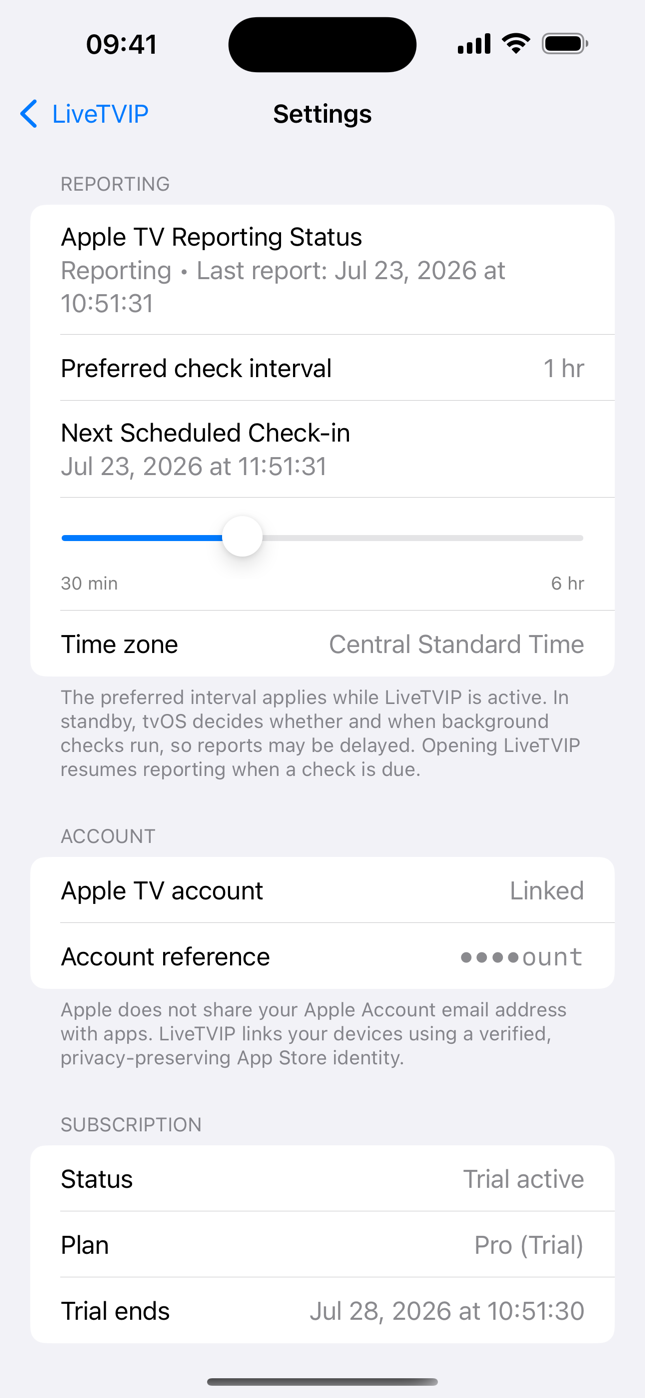
30 minutes, 1 hour, 2 hours, or 6 hours, applied while the app is active and shared across the Apple TVs on your account.
Manual check on demand
Check IP Now from Apple TV Settings when you need an answer immediately, with a visible daily allowance.
One, five, or 100 Apple TVs
Device limits are enforced on the server, not merely suggested to the app, and each Apple TV is listed by name.
Honest status screens
Settings show reporting status with the last report time, the next scheduled check-in, your time zone, plan, and app version.
Localization first
Interface text uses a string catalog, and server-sent notifications use localization keys rendered by your device.
Five free days of Pro
No payment method required, and the clock only starts once LiveTVIP has actually retrieved your first address.
The trial
A five-day Pro trial. No payment method required.
The trial begins when LiveTVIP first retrieves your Apple TV's public IP address, not when you install the app.
During the trial
- Pro capabilities are available, including custom intervals and the ntfy and webhook integrations.
- No payment method requested anywhere in the flow.
- No trial subscription to cancel, because the trial does not start an App Store subscription.
- Trial status is labelled Pro (Trial) in the app.
After five days
- You choose a plan to continue using the reporting service. Subscriptions are monthly and managed in your App Store settings.
- No permanently free tier, honestly, because the reporting server costs real money to run.
- Purchase choices appear after access ends. If access cannot be checked because of a network error, the app shows an explanation and a Retry button.
- Restore Purchases works across devices using Apple-signed purchase information verified on the server.
Plans
Pick by how many Apple TVs and how fresh you need it.
A straight ladder, not a matrix. Move up when you run out of Apple TV slots or you want a shorter interval, and Apple handles the upgrade in one tap.
Basic
1 Apple TV
- Hourly preferred interval
- Latest reported public IP
- 30-day detected-change history
- On-screen alert on the Apple TV
- iPhone push when a change is detected
- iPhone and iPad dashboard
Pro
1 Apple TV
- Everything in Basic
- Choose 30 minutes, 2 hours, or 6 hours
- ntfy topic alerts
- JSON webhook alerts
- Larger daily manual-check allowance
Multi
Up to 5 Apple TVs
- Everything in Pro
- Five linked Apple TVs
- Each one named on the dashboard
- Second home, rental, or small office
Fleet
Up to 100 Apple TVs
- Everything in Multi
- One hundred linked Apple TVs
- Server-enforced slot limits
- Managed sites and venues
All plans are monthly auto-renewing subscriptions and renew until cancelled in your App Store settings. Current prices differ by country and are shown in the App Store before purchase. One universal purchase covers Apple TV, iPhone, and iPad.
Straight talk
What LiveTVIP is not.
Plenty of apps would happily sell you a promise that the platform cannot keep. Here is the boundary, in plain language, before you install rather than after.
Not 24/7 uptime monitoring
Your interval applies while LiveTVIP is active on the Apple TV. In standby, tvOS decides whether and when background activity runs, so reports can be delayed. Freshness is genuinely useful and genuinely best-effort.
Not an outage detector
A missing report does not establish that your network is down, so LiveTVIP does not offer offline or missed-check alerts.
Not the exact moment of change
The address changed somewhere between two reports. LiveTVIP records when the difference was detected, and says so, instead of inventing a precise timestamp.
Not your LAN address
You get the public address of the network your Apple TV is connected to, which is what outside services see. Private addresses handed out by your router are a different thing.
Not a shared or borrowed slot
Apple TV limits are enforced on the server. If you replace a linked Apple TV, the old one stops reporting entirely rather than lingering as a silent extra device.
Subscription supported
LiveTVIP uses monthly subscriptions to support the reporting service.
Privacy and security
What the service stores and why.
LiveTVIP uses a server to store reports, link devices, determine access, and deliver requested alerts.
Account and request handling
- LiveTVIP account and device identifiers are random values. Keyed hashes derived from Apple-verified purchase identities are also stored to link devices and enforce access.
- Authenticated app requests use timestamped HMAC signatures and nonces to limit replay.
- Purchase status is verified on the server using Apple-signed purchase information.
- Apple DeviceCheck helps enforce trial eligibility for an Apple TV.
Data used by the service
- Reports: public IP addresses and the times they were received.
- Service state: access status, app and OS versions, and limited operational events.
- Notifications: an Apple Push Notification service token when notifications are enabled.
- History display: the app shows detected changes from the previous 30 days. Server records may be retained longer for service operation, security, and troubleshooting.
Read the Vertolini, LLC privacy policy for details about what is collected and why.
Requirements
What you need.
| Apple TV | tvOS 18 or later. This is the device that reports, so LiveTVIP needs to be installed here. |
|---|---|
| iPhone or iPad | iOS 18 or iPadOS 18 or later. Optional, but this is where the dashboard, history, and push notifications live. |
| Apple Account | The same Apple Account on both devices. No pairing code is required. |
| Purchase | One universal purchase covers Apple TV, iPhone, and iPad. Monthly subscription after the five-day trial. |
| Network | Ordinary internet access. No port forwarding, no dynamic DNS account, no router configuration. |
FAQ
Questions people actually ask.
What exactly does LiveTVIP show me?
The public IP address that your Apple TV successfully reported, plus the time that report happened, shown in your device's time zone. That is the address the rest of the internet sees when traffic leaves your network.
LiveTVIP also records when a later report contains an address different from the previous one, and keeps 30 days of those detected changes.
Why use an Apple TV instead of a script on a computer?
An Apple TV is often already plugged in and connected to your home network. LiveTVIP uses it to report your public IP without requiring a separate computer, script, or dynamic DNS account.
Is LiveTVIP uptime or outage monitoring?
No. Your preferred interval applies while LiveTVIP is active on the Apple TV. In standby, tvOS decides whether and when background activity runs, so a report can be delayed.
Because a missing report does not establish that a network is down, LiveTVIP does not offer offline or missed-check alerts.
Do I need to create an account or remember a password?
No. There is no sign-up form, no password, and no email address to hand over. Your Apple TV and your iPhone link themselves through your verified App Store identity, and LiveTVIP identifies your account with a random identifier that it generates itself.
Apple does not give apps your Apple Account email address, and LiveTVIP does not store your name or email.
How do I get told when my IP address changes?
Four ways, and you can use more than one. An on-screen banner appears on the Apple TV with the new address, the previous address, and the detection time. A push notification can arrive on your iPhone or iPad. LiveTVIP can publish to an ntfy topic you subscribe to. And it can POST JSON to a webhook URL you control, so your own automation can react.
A Send Test Alert button lets you check the configured channel.
How often does LiveTVIP check?
You choose a preferred interval of 30 minutes, 1 hour, 2 hours, or 6 hours. Hourly is the default and is available on every plan; choosing a different interval is a Pro feature. Those intervals apply while the app is active.
You can also run a manual Check IP Now from Apple TV Settings, which has a short cooldown and a daily allowance so the service stays fast for everyone. The allowance is larger on Pro and during the trial, and Settings shows how many checks you have left today.
Can I watch more than one Apple TV?
Yes. Plans cover one Apple TV, up to five, or up to 100, and the limit is enforced on the server rather than trusted to the device.
Each Apple TV appears on the iPhone dashboard by name with its own report recency. If you run out of slots, LiveTVIP offers either an upgrade or the option to use the new Apple TV instead, and the replaced one stops reporting.
Is there a free trial?
Yes. The five-day Pro trial requires no payment method. It starts automatically the first time LiveTVIP successfully retrieves your Apple TV's public IP address.
After five days, continued service requires a plan.
Does one purchase cover Apple TV and iPhone?
Yes. LiveTVIP is a universal purchase, so a single subscription covers the Apple TV app and the iPhone or iPad companion. Sign in with the same Apple Account on both and they find each other.
What happens if the network drops while I am looking at my phone?
The last successful report remains visible, clearly labelled with its time, along with a short message explaining that the refresh did not go through.
What does LiveTVIP do with my data?
It stores the reported public IP addresses and report times needed to show your history, random account and device identifiers, keyed hashes derived from Apple-verified purchase identities, your access status, app and OS version, limited operational events, and a push token if you enable notifications.
The app displays detected changes from the previous 30 days. Server records may be retained longer for service operation, security, and troubleshooting. More information is available in the Vertolini, LLC privacy policy.
Does the address shown include my Wi-Fi or LAN address?
No. LiveTVIP reports the public address of the network the Apple TV is connected to, which is what an outside service observes. It is not the private 192.168 or 10.x address your router hands to devices inside the house.
Put your public IP address on the biggest screen in the house.
A five-day Pro trial with no payment method. The trial begins after LiveTVIP retrieves your first address.
Available on the App Store for Apple TV, iPhone, and iPad.
- Apple TV, iPhone, and iPad
- One universal purchase
- No sign-up form
- Manage subscriptions in App Store settings